
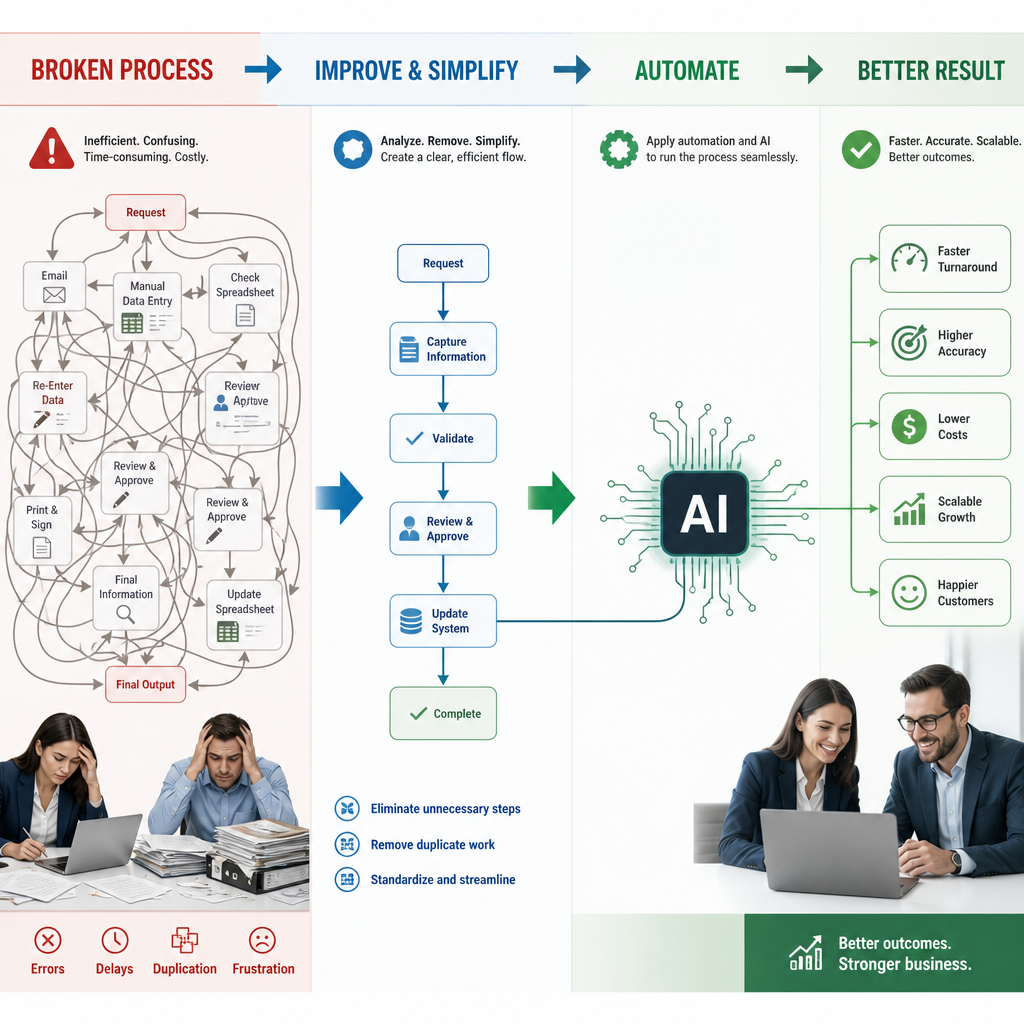
AI Automation Is Powerful, but It Is Not the Starting Point
Automating a broken process does not fix it. It simply produces the same broken result faster, at greater scale, and often with less visibility into what went wrong.
That distinction matters as business owners look to AI automation for faster customer service, lower administrative workload, fewer manual errors, and the capacity to grow without adding proportionate headcount. These are valid goals. AI can classify information, draft responses, route work, extract data from documents, and support decisions at speeds that manual teams cannot match.
But AI delivers its best results when it is applied to a workflow that is already clear, sensible, and well designed. If employees are following inconsistent rules, entering the same data in multiple places, seeking approvals that add no value, or relying on informal workarounds, automation will reinforce those weaknesses. It may even make them harder to identify and change later.
The more reliable path is:
Understand → Improve → Simplify → Automate
First, establish how the work actually gets done. Then address the weak points, remove unnecessary steps, and make ownership and decision rules clear. Only then should you automate the remaining work that genuinely benefits from greater speed, consistency, or scale.
“Before you automate the work, make sure it’s work worth automating.”
AI is not a substitute for workflow optimization. It is the final multiplier of a process that already makes business sense.
Why Automating a Messy Process Creates Bigger Problems
Technology cannot repair a process that does not make sense. If a workflow includes unnecessary approvals, duplicate data entry, unclear ownership, or inconsistent decision rules, AI automation will usually accelerate those weaknesses rather than remove them.
For example, automating the transfer of the same customer information across three systems may save a few minutes per case. It does not answer why three systems need the same data, who owns its accuracy, or whether one system could serve as the source of truth. Similarly, automating approval reminders does not solve an approval structure that requires too many people to sign off on routine decisions.
Automation can also make poor practices harder to spot and change. Once a flawed workflow is embedded in software, it can appear official, fixed, and difficult to challenge. Teams may adapt to the automated process instead of questioning whether its steps still serve a purpose. Changes then require configuration, testing, retraining, and potentially new vendor costs.
Watch for warning signs such as employees copying information between systems, repeated follow-ups, manual handoffs, long approval queues, frequent exceptions, and uncertainty about who is responsible for the next action.
AI should solve a defined business problem, not add another layer of complexity to an already complicated operation. Before selecting a tool, business leaders should ask: “Why are we doing it this way in the first place?”
Start With Workflow Optimization: Understand What Really Happens Today
Workflow optimization starts with an honest view of the process as it is actually performed, not as a policy document, flowchart, or manager assumes it operates. The difference is often significant. Written procedures rarely capture the email follow-ups, spreadsheet trackers, informal approvals, system workarounds, and manual corrections that keep work moving each day.
Speak to the people who perform the work. Frontline employees, team leaders, and customer-facing staff can identify where requests stall, information arrives incomplete, tasks are repeated, and customers become frustrated. Their experience reveals the practical gaps between the intended workflow and the real one.
Map the process from beginning to end, examining:
- Triggers and inputs that start the work
- Decisions, rules, and approvals
- Handoffs between people, teams, or systems
- Systems used and information entered into each
- Exceptions, rework, and escalation paths
- Outputs, customer outcomes, and measures of success
Look closely for bottlenecks, duplicate data entry, unnecessary reporting, avoidable waiting time, and steps that exist only because of outdated policies or limitations in previous technology. A step may have made sense years ago, yet no longer serve a useful purpose.
This stage is not a technical AI project. It requires observation, practical questions, and the willingness to challenge assumptions. Only when you understand what truly happens today can you decide what should happen tomorrow.
Improve and Simplify Before You Automate
Once the current workflow is visible, the next task is to improve what genuinely needs to remain. Clarify decision rules so employees do not have to interpret them differently each time. Assign clear ownership for each handoff. Standardize forms and required information. Remove duplicate approvals, consolidate systems where possible, and reduce exceptions that exist only because the normal process is unclear.
Then simplify. The goal is not to make every existing task faster. It is to create a workflow with fewer steps, decisions, and handoffs. In many cases, the best automation opportunity is eliminating a step altogether, rather than using technology to perform it more quickly.
For example, if two teams both review the same low-risk request, removing one review may create more value than building an AI tool to route and summarize the request for both teams. If staff enter the same customer details into three systems, a single source of data may solve the problem without any AI investment.
This is where workflow optimization produces its greatest returns. A simpler process requires fewer rules to train, fewer edge cases to manage, and fewer failure points to monitor. The resulting ai automation is typically cheaper, faster to implement, and more reliable.
Sometimes the right recommendation is less technology, not more. A well-designed process can deliver shorter cycle times, fewer errors, and less administrative work before AI enters the picture.
A Realistic Example: Simplifying Customer Onboarding Before Adding AI
Consider a mid-sized services company where new customer onboarding is slow, inconsistent, and heavily dependent on email. Leaders initially believe they need AI automation to manage the paperwork, answer follow-up questions, and reduce the administrative burden on staff.
A workflow review tells a different story. Sales representatives submit incomplete customer details. Operations staff re-enter the same information into several systems. Managers approve every account, including routine, low-risk customers. Customers receive repeated requests for documents because different teams use different forms, while staff spend hours chasing missing information by email.
The issue is not primarily a lack of AI. Several forms collect the same data, routine accounts do not require management review, and most delays begin with incomplete submissions.
The redesigned process starts with one standardized digital intake form. Required fields prevent incomplete submissions, ownership is clear at every stage, and all teams work from a single source of customer data. Automated status updates keep customers informed, while risk-based rules send only higher-risk accounts to managers for approval.
Only then does AI become useful. It can review uploaded documents for missing details and draft tailored follow-up messages when information is incomplete. Because the workflow is already sound, the final automation is smaller, less expensive, easier to implement, and more reliable.
Make AI the Final Step in a Better Way of Working
The customer onboarding example illustrates the right order of operations for any AI initiative: understand the workflow as it truly operates, improve its weak points, simplify unnecessary steps, and then automate the work that still benefits from greater speed, scale, or consistency.
For process owners, the test is not whether an AI tool can perform a task. It is whether the task contributes to a meaningful business outcome. Evaluate opportunities through measures such as shorter cycle times, fewer errors, lower manual effort, improved compliance, and a better customer experience. Technology novelty is not a business case.
Before asking, “How can AI automate this?”, ask two more important questions:
- “Should this step exist at all?”
- “What would a simpler process look like?”
Those questions often reveal that a policy can be retired, an approval can be removed, or a handoff can be consolidated. In some cases, workflow optimization alone delivers most of the value, without adding another platform or model to manage.
AI automation is an extremely valuable capability, particularly where teams must process high volumes, interpret unstructured information, or provide timely, consistent responses. But it delivers its greatest return when it supports a workflow that is already clear, purposeful, and well designed.
The takeaway is simple: successful AI automation does not begin with AI. It begins with understanding the problem, removing what does not add value, and designing a better way to work.